Widgets and Pages
Every widget the open island can show, the sizes they come in, and how to arrange your own pages.
The open island is a few pages of widgets. Each page is a grid four cells wide and two high, and each widget covers one or more cells.
Sizes
| Size | Cells | Good for |
|---|---|---|
| Small | 1 × 1 | A quick look: the weather, a timer, the battery |
| Wide | 2 × 1 | A row: clips, PC stats, the time with its buttons |
| Tall | 1 × 2 | A column: today, next prayer, a narrow list |
| Big | 2 × 2 | Now playing, AI agents, the calendar, notifications |
| Full width | 4 × 1 | Notes, the teleprompter, clips |
Each widget only offers the sizes it is drawn for, and a page never takes more than eight cells.
Arranging your pages
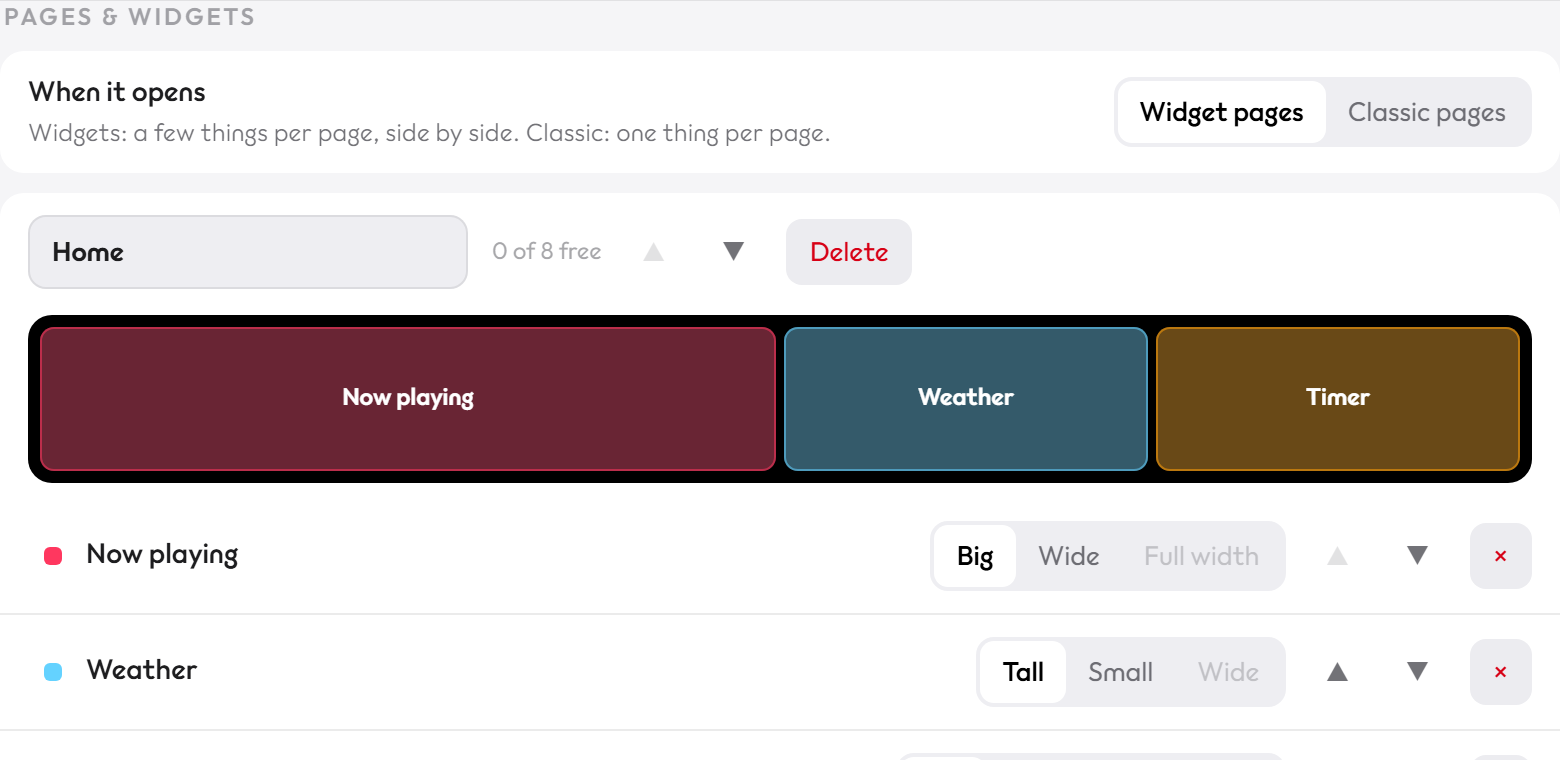
Open the settings and go to Pages & widgets. Each page has a small map of its grid:
- Drag a widget in the map onto another widget to swap them, on the same page or on another page.
- Drag it onto a page's empty space to move it there.
- Pick a size with the buttons beside it. Sizes that don't fit are greyed out.
- Add a widget, Add a page (up to six), rename, reorder or delete pages.
Tip
Prefer one thing per page? Choose Classic pages at the top of Pages & widgets.
The widgets
| Widget | Shows |
|---|---|
| Now playing | The song, artwork or record button, controls, progress, shuffle, repeat and volume |
| Weather | Temperature, the sky, your city, today's high and low |
| Timer | A timer, a stopwatch and a focus (pomodoro) clock, which can all run at once |
| Today | The date, the Hijri date (with prayer times on) and countdowns you add |
| AI agents | Your Claude Code sessions: what each is doing, and your plan usage (AI agents) |
| Calendar | Your next events from an iCal link, with Join buttons for Zoom, Meet, Teams and Webex |
| Notifications | Every pop-up you got, newest first, with the sender's picture |
| Recent clips | Your three newest clips: hover to play, click to open, copy the file |
| PC stats | CPU, GPU, RAM, free space on your drives, ping and a speed test |
| Battery | Charge, time left, battery health and what is using it most |
| Notes | A notepad, saved as you type |
| Shelf | Files you dropped on the island to keep handy |
| Scores | Live scores for your teams |
| Teleprompter | Your script, scrolling under the webcam |
| Next prayer | Today's prayer times with the next one highlighted (prayer times on) |
| Extensions | Your own widgets (Extensions) |
The calendar
Paste your calendar's secret iCal link in the settings. In Google Calendar it is under your calendar's settings, Secret address in iCal format. In Outlook, publish the calendar and copy the ICS link. A meeting about to start pops up with a Join button.
Scores
Add your teams in the settings: Premier League, La Liga, Champions League, MLS, NBA, NFL, NHL or MLB. While your team plays, the score updates every minute, and a goal pops up with the team's crest.
Something wrong or missing on this page? Tell us on GitHub.